
XRF Analog Output Hub
Eight‑channel 4–20 mA current‑loop accessory for MasterXRF
Extend process control by mapping live element concentrations to PLC‑ready 4–20 mA outputs. Simple USB connection, flexible scaling, and deterministic fail‑safe behavior.
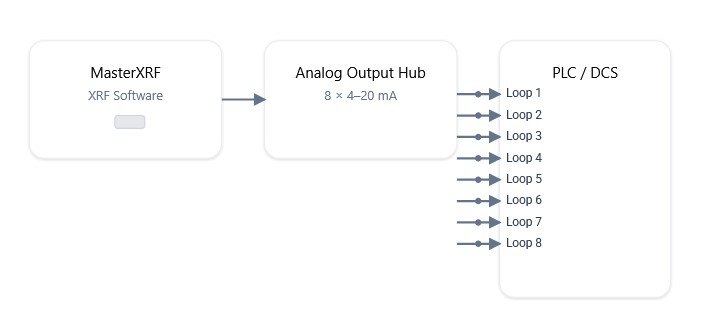
Simple USB Integration
Plug‑and‑play USB link between MasterXRF and the Hub for fast installation.
8 Loops, 4 Ports
Up to eight 4–20 mA outputs shared across four physical ports for flexible wiring.
Flexible Scaling
Specify concentrations for 4 mA and 20 mA per channel—automatic scaling handles the rest.
How it works
- Connect the Hub to MasterXRF via USB and wire the 4–20 mA loops to your PLC/SCADA.
- Open the Analog tab in the XRF software to view channels by Application and Element.
- Use Edit Analog Config to assign elements by editing
AnalogOutputs.csv. - For each channel, set the element concentrations that correspond to 4 mA and 20 mA; the software performs linear scaling.
- Per‑channel timeout ensures fresh data; timed‑out channels are disabled and outputs are driven to 0 mA.
Note: Disabling a port disables its associated outputs. Output history is not shown in the Analog tab (use the Chart tab for trends).
Scaling & Conversion
To convert concentration to current (used by the XRF):Conc2mA(Conc, C4, C20) = 16 * (Conc - C4) / (C20 - C4) + 4
To recover concentration from current (for PLC logic):mA2Conc(mA, C4, C20) = (mA - 4) * (C20 - C4) / 16 + C4
OVER/UNDER/TIMEOUT conditions set output to 0.00 mA.
Software Features:
- Eight 4–20 mA outputs — Up to eight analog outputs shared among four ports for flexible plant wiring.
- Application/Element mapping — Assign outputs by application and element so each loop represents the metric you care about.
- CSV‑based configuration — Edit AnalogOutputs.csv from the Analog tab—no extra tools required.
- Per‑channel timeout — Guarantees data freshness; timed‑out channels are disabled automatically.
- Deterministic error handling — OVER, UNDER, or TIMEOUT conditions force output to 0.00 mA for safe interlocks.
- Charts in main app — Use the Chart tab for element history; the Analog tab focuses on live outputs.
Technical Specifications
| Electrical | |
| Outputs | (8) independent 4–20 mA current loops (shared across up to 4 ports) |
| Resolution/Scaling | User‑defined C@4mA and C@20mA per channel |
| Error behavior | Outputs forced to 0.00 mA on OVER/UNDER/TIMEOUT |
| Timeout | Per‑channel timeout (minutes); disables output if exceeded |
| Software Integration | |
| XRF App Tab | Analog tab: live view of assignments and output state |
| Config Access | “Edit Analog Config” opens AnalogOutputs.csv |
| Assignments | By Application and Element; updates via “Update Display” |
| History | Element concentration history available in Chart tab |
| Connectivity & Ports | |
| Host | USB connection to MasterXRF |
| PLC Interface | 4–20 mA loops, PLC‑ready |
| Channels | Up to 8 channels; disabling a port disables its associated outputs |
| Part & Ordering | |
| Part Number | U600211 |
| Name | XRF Analog Output Hub |
| Compatibility | MasterXRF systems |
| Support | Pratt & Whitney Sales & Technical Support |
 Free USB
 Product &
 Celebrating